Midland MXMC01 Undocumentation – Speaker Select
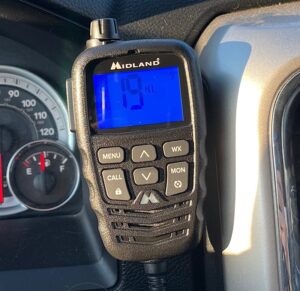
The Midland MXMC01 is a replacement/upgrade Speaker/mic for your Midland MXT275 or MXT 575 GMRS radio. When you can find it in stock, that is. Been especially hard to try to get one since it came out. Sells out fast. It boasts a much larger display that translates into more human words in the menu system rather than codes. The mic features Automatic Noise Cancellation to filter out unwanted noise when transmitting. And my favorite addition – a real power/volume knob instead of buttons. What’s conspicuously missing from the documentation is any reference to the built-in speaker of the the handheld mic. It does have one and here is how to choose between the mic and radio base speaker.
What it doesn’t have is the same method to change it in the menu system. It is missing from the menu but is still there and can be selected by short-pressing the Lock button and using the Channel up/down buttons to select.
To the bottom right of the active channel number you’ll see the same abbreviations you are accustomed to if you used that feature on the old display:
HF AO = handheld speaker is active/radio base speaker is off.
HO AF = handheld speaker is off/radio base speaker is active.
HO AO = both the handheld and the radio base speaker are active.
No confirmation button to select – wherever you leave it in the menu is where it will stay until you change it.
Click here to view the custom install of my GMRS radio install in my Ram Laramie.