Posted
on February 10, 2023, 1:49 pm,
by Walt,
under
review.
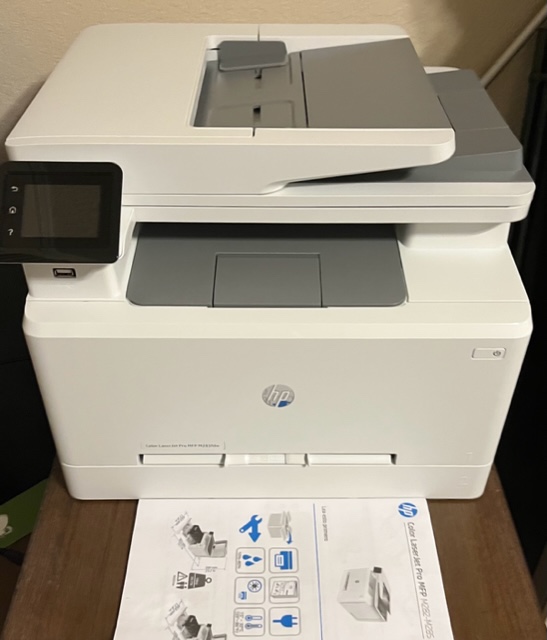
I set up the new printer, an HP Color Laserjet Pro M283fdw over two days. Each day, first thing in the morning after brewing my coffee. Because the day doesn’t even begin until I’m sipping on that bold brew.
Day 1. I opened the box. Turned it upside down and lifted the box off the printer. It was well shielded by styrofoam and soft plastic wrap. After removing the side pieces of the foam I noticed the standard pieces of orange tape they use at the factory to secure all the flaps and trays. Peeled them off. It comes with the toner cartridges already installed. Placed the MFD on its table, plugged it in and powered it up. Selected my language. That took all of 4 minutes, if that. And that was all I planned to do for that day.
Day 2. Same thing. Coffee. Went to the touchscreen, enabled the Wi-Fi. It showed me my network. I typed in the password on it’s iPhone-sized touchscreen keyboard. Connected. Opened an email on my iPhone and printed. Painless. Earlier in the week I had already created its email account on my mail server for it to scan to email. Also very simple for those in the know. I touched the network icon on the touchscreen, saw the IP address of the built in web server of the MFD. Selected the Scan tab. Provided the SMTP and port information. Saved. Added both our email addresses in the phone book. Placed a document in the feeder, selected Scan, chose my email address. Perfect. This took another 4 minute chunk out of my morning routine.
As far as I’m concerned, it was done. Not having owned a computer for 8 years now, I am lucky enough to have no real computing power requirements. My iPad Air and iPhone are all that I use. Carol, on the other hand, just got a brand new MacBook. I was sure it would work for her too. Sure enough, that night she was able to connect right to it. She asked, “Is it called Goliath?” Yes. Yes it is called Goliath.
Easiest setup ever.
Posted
on February 8, 2023, 10:56 am,
by Walt,
under
WTF?.
You know, where you rob from the poor to give to the rich? Sounds like I’m talking about our tax system, but no. My wife, Carol, chose the education sector as her 2nd career. First high school and now elementary (Grade 2). Either way, It’s one of the few jobs that does not follow the norm where you bring office supplies home for personal use. Instead, you steal home supplies to fund your work. How fucked is that? You want to succeed. More importantly, you want your kids to succeed. But you’re just not provided the means to make that happen other than a room and pedestal. Turns out heating and cooling is optional too.
As a parents we always resented having to get that supply list at the beginning of the year. Sending my son to a private school I resented it even more. Bitch, I’m paying for this education. Don’t be charging me and then giving me a list of shit I’ve got to buy. Charge me more for the cost of the school instead. Goddamn. But I digress. Not sure if it was just me but when I was in school all essential supplies were provided by the school. We took this resentment with us into our 2nd careers and we buy all the supplies her children need. There is nothing like seeing a semi-truck offloading a pallet of composition books in your driveway with a forklift. True story bro. Shoot, we even bought a scantron at one point so she wouldn’t be spending 5 hours grading 150 tests.
At one point, she was given an “allowance” of what turned out to be 3 sheets of paper per student per month, due to the insane amount of students she was responsible for. The school actually tracked that shit and cut you off when your limit was met. That’s when I got her the Xerox Workcenter. A veritable workhorse. Peripheral supplies included toner and paper. Xerox was a good/bad choice. Good in that it was a great multifunction device. Flatbed scanner, document fed scanner. Scan to email. Copy machine. Loved it. The bad? Only Xerox will work on it around here. Not sure if that’s everywhere or just my particular area here in the the desert southwest. As soon as you tell them it’s a Xerox all bets are off. Eventually the scanning component quit working, which included making copies. Minor inconvenience. She used it mainly for mass printing from her computer. It cost less just to buy a cheap scanner for when I needed that particular feature and I did.
After 7 faithful, hard years, some plastic flap from inside fell off. That flap is part of a larger component that would cost around $200 to replace. Another $200 for the part that would fix the scanning. That’s if I do it myself. An additional $200 for the Xerox on-site Maytag repairman to show up and do it for the first hour only. That was my motivation to look at some of the new devices out there. I’m already up to $400-600. That sounds like a new machine to me. Xerox was definitely off my list from a service perspective. I settled on the HP Laserjet Pro M282. It has everything I was looking for including built in email server for quick scan to emails that I enjoy. Plus it’s rated for up to 2500 copies per month. Carol approved.
I wanted to order it off Amazon, but they wouldn’t deliver to my pickup locations – said it was too heavy. I didn’t want it sitting outside my house during the day. That led me to checking out Best Buy. Wow. Been over a decade since I stepped inside a Best Buy. Technically, I didn’t step in side this one either. Curb side pick up baby. Last time I bought something from Best Buy was when X-Files and Star Trek seasons were just being released as new on New Movie/Music Tuesdays. Remember those?
Pulled it out of the box this morning. Peeled off all those hold-in-place sticker. Plugged it and fired it up. They still come with a power cord, USB cord, and telephone cord (people still use those?). There is a nice user manual on the website I’ve downloaded. I’ve already set up the email account on my mail server for use in scan-to-email functions. Might have it up and running by the weekend.
Posted
on February 1, 2023, 10:17 am,
by Walt,
under
Mastodon.
Since Megalomaniac Musk killed off 3rd party Twitter clients, I began my journey into the other world of comparable microblogging platforms. I noticed that most of those humans I followed and respected had migrated over to Mastodon. Naturally, I gravitated towards it.
Like a raging anti-vaccer, I “did my research,” went to the Join Mastodon page, and proceeded to sign up. My first choice was to select a server. I heard about this. Decentralized. Each server is called an “instance.” No one instance is in charge. I sifted through the plethora of servers that were available. Many of them had target audiences geared towards certain topics or hobbies. I settled on one that was designated “general purpose.” I tend to ramble on about any and all matters. Whatever strikes my fancy at the moment. It was called mstdn.plus. That seemed to fit my random screed. One minute I’m talking about roasting raw coffee beans, the next I’m detailing how I reinforced my RV axle.
After setting up my account I found the majority of those I followed on Twitter and found it rather enjoyable. It was like old times. It reminded me of the early days of Twitter. My feed wasn’t overwhelming with ads or algorithmic promotions. I liked it. Mastodon had its own brand of app for the iPhone and iPad, but like Twitter’s, seemed basic at best. Scratch that. It was, in fact, better than the Twitter branded client, but didn’t seem on par with either Ice Cubes and (eventually) Ivory.
This all happened on January 22. I was loving it. Even began a monthly donation to the server. A week later I noticed I wasn’t seeing anything new from the night before. Strange. I posted something about it being quiet and all. Someone locally responded, basically saying that the server upkeep wasn’t going on as it should. The Admin hadn’t been heard from since last year. Best to start migrating over to another server. Great. Time to start searching for a new server. I’d love to be on the mastodon.social but they were no longer accepting any new users due to the influx they had from Twitter defectors.
After doing more research, I decided to host my own instance of Mastodon. Why not? I know that bitch ain’t going to go down unless I want it to. I already own my domain and servers. It just made sense. So I did. Created my user. Promoted to admin. It’s an empty warehouse when you first sign on to your own instance. Blowing tumbleweeds. Complete silence in the digital world. Until you start adding the humans you intend on following. Then it blows up from there. For now, it’s purely for my use. I made sure to turn off letting other sign up for accounts.
Now witness the firepower of of this fully armed and operational Mastodon instance.
Wow. There’s a lot to unpack in Exodus 4. Today I’ll cover the first half.
This is the part of Moses’ story where the Judeo-Christian God (henceforth, just God) is telling him to go to Egypt and demand that they let his people go. Remember, they are slaves at this point; to the Egyptians. God even gives Moses the power to perform some magic tricks to prove that God sent him. Moses doesn’t think he has the wherewithal to deliver this message but God assures Moses that he can. And will. Moses explains to God that he’s not the man for the job. Not eloquent, and claims to be “slow of speech and tongue,” to which God replies, “Who gave human beings their mouths? Who makes them deaf or mute? Who gives them sight or makes them blind? Is it not I, the Lord?” (verse 11).
Woah. Did God just let it slip that He’s the one responsible for for making human’s deaf and mute? Interesting. Most God-fearing folk I know would like to say no, the devil, or original sin is responsible for handicaps some may inherit. But here we have God himself straight up owning that shit. So which is it? Is God responsible for defects and diseases? Is he the cause or the solution? Surely a loving, caring God would never be responsible for unfortunate birth defects. If he’s not responsible, then we have a case where God simply ain’t all powerful now, is he? Either he is omnipotent and could stop that from happening or he 1.) Doesn’t care; or 2.) Is not omnipotent.
Some would like to argue that it’s not that God doesn’t care, we don’t know. God works in mysterious ways. We’ll never know God’s reason. His reasons are beyond our comprehension. Bull shit. Ain’t nothing mysterious about it. If God want us to mirror his love, well he better be showing us a real image of love to reflect. Goose. Gander.
On the next ASS – again, with some foreskin stories. What is it with the Bible and it’s Foreskin Fetish?
Posted
on January 21, 2023, 7:33 pm,
by Walt,
under
RV Repair.
Standard equipment disclosure first. 2015.5 Lance Model 1995 with Atwood 6 gallon water heater. Atwood has since been bought out by Dometic. Same shit. Different day. Plenty of parts available online. Both OEM and aftermarket.
We spent last weekend at Davis Mountain State Park. We even had shore power to hook up to. Most camping trips for us are to remote places and strictly boondocking. For us, that’s the point. Enjoy having nobody around us for miles. Freedom to let the dogs out without leashes. Our goal for this trip was to hike over the Davis Mountains and into Fort Davis National Historic Site. Reservations were made, electricity was available.
Even though we were at an electric site, I still prefer to use propane to heat the water. Gets hotter faster and seems to recover faster as well during showers. I turn on the water heater.
The usual click click click *whumpf* did not happen. This time it was click click click *whumpf* click click click silence. Uh oh. Not wanting to have to troubleshoot I simply turned off the propane side and and turned on the electric portion of the heater. Problem temporarily solved. Good thing we were at an electric site when this occurred or I would have had to begin troubleshooting right away. We went on to enjoy a fine 4-day weekend with plenty of hiking and relaxation.
Now that I’m home it’s time to troubleshoot. The igniter is working. It lights the flame, but it appears it doesn’t know that it lit the flame because it keeps clicking. Once it senses a flame it should quit clicking (trying to ignite). If it doesn’t sense a flame, it will close the gas valve for safety reasons. Since I know it is in fact lighting, it could be one of two major components: the flame sensor or the motherboard (some call it ignition board). Or the wiring in between any of them.
Trying the easy thing first, I unplug the igniter and pull it out of the fire tube. The flame sensor is part of this. One screw under the L-bracket holds this in place. Easy to remove. Both rods look pretty dirty.Other than that, the ceramic is fine. Wire is fine. I take some sand paper to the rods and shine it up. Everything else looks in tact. I reinstall the igniter and plug it back in. Turn on the water heater and wait.
Click click *whumpf* and stays lit. Fixed!
I got out of jail easy this time.