Posted
on January 6, 2023, 10:26 am,
by Walt,
under Install.
Hailing frequencies open! Finally got my FCC license for a GMRS (General Mobile Radio Services) radio, making me legit now. Call sign is WRVD394. VD? Seriously? Oh well.
I’ve always enjoyed having a big ol’ honkin CB radio in my vehicle. My entire life. Big. Chrome. Knobs. Backlit dials and screens. Amplifiers (why, that’s highly illegal, Corey and Trevor). This time around I took the plunge into the GMRS world and when choosing a radio I wanted one that would not be out in the open. For a couple reasons. First and foremost, I’m tired boss. I’m tired of finding places to mount a big old radio someplace other than on my dash. I’ve had them under the dash. I’ve had them in a console area. I’ve had them mounted to the top of the ceiling. I’ve even permanently removed sun visors (who needs them when you have sunglasses?) in order to mount my CB radio in it’s place. Someplace where I can easily see all those gorgeous knobs and dials. Getting your radio installed in these positions usually involve some type of electronic/aesthetic fuckery to get the power and antenna wires routed without being noticed. Secondly, Since I’m getting a new radio, I might as well upgrade from CB and hit the next level – GMRS. Had a HAM radio years ago. Too amateurish for my likings. Wanted something a little more mainstream.
This time around, I wanted a professional (interpret: stock) looking installation. As previous installs, I did NOT want this on the dash. Too many lookers and sunshine. I also did not want it in my usual places. I wanted to keep the Laramie looking as stock as possible. Because, damn… it’s a fine looking interior as it is and I don’t want to cheapen it’s look. So that left me with getting a radio with all the controls on the mic, while the radio itself gets tucked away somewhere where it won’t be noticed. I decided on the driver’s side, under the dash, but on the side of the console. Easy place to mount the bracket as well as have the wires well hidden. I chose the Midland MXT275.
Midland MXT275
The mic, I wanted in a handy location. Before drilling into my dash to mount the mic holder, I chose to drive around for about a month in some temporary locations. Needed to see where I liked it and where I did’t. I was hoping to be able to just have it hanging from a visor hook or something. They have these mic holders on pull out strings that you can clip to anything. Didn’t like those too well. Eventually decided on the dash between the instrument cluster and the controls on the console. At first I thought I might get away with the self-adhesive 2-sided tape that accompanied the holder, but no. That El Paso Sun had the mic sitting on the floor every day. I did like the spot I had it, so I drilled a couple small pilot holes through the holder and dash and secured it there. Perfect.
Mic location
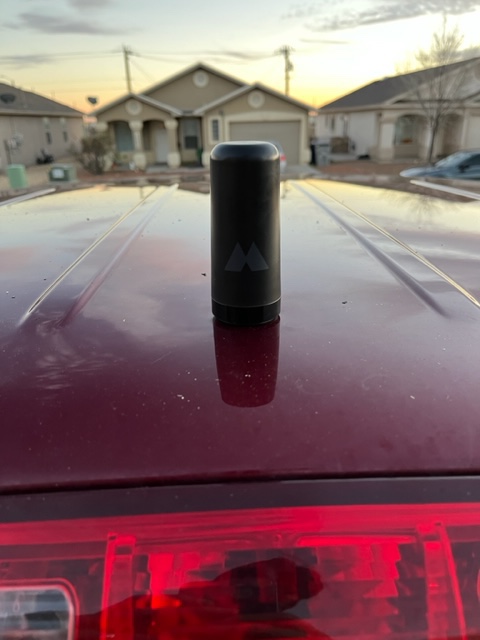
I installed the radio with included antenna early November. Came in real handy for our Thanksgiving and Winter camping trips. Also got a couple of new GMRS handhelds to go along with it that charges off USP port – real handy for charging while in the RV. The antenna I wanted (MXTA25) was not available but was on backorder due to the export/COVID issues in China. Eventually I was notified that it was back in stock in limited supplies. Ordered it along with a low profile antenna cable (MXTA24). Arrived just before our last trip but didn’t have the time to do a proper install. Instead, that provided me with enough time to think about where I wanted this new antenna. I had the included antenna already temporarily installed and attached via magnet. This new one could go on the roof. On the hood. On the bed rails.
I decided to mount it on the roof. Towards the back like the stock FM radio/satellite radio/GPS antenna, and centered. Ideally, I’d want it center mass on the roof, but I didn’t feel like removing the entire headliner to get there. Putting it 6 inches from the back, I still had easy access through the third brake light, and I could easily loosen the rear portion of the headliner inside to be able to work the cabling through. So there I was drilling a hole in my roof. Just enough for the RF connector to fit through. Gaskets were included in the mount. The Antenna screws down onto it. I included another gasket between the antenna and antenna cable just to be safe.
Posted
on January 6, 2023, 8:16 am,
by Walt,
under news.
NOUN-
A general decrease in the valuation of your company when your main boy thinks he can buy and run another company – but instead fucks it.
NPR is reporting that Tesla stock not only lost 65% of its value in 2022, but 12% in a single day in 2023. Also provides four reasons why. Here are my four.
1. Elon Musk. General fuckery.
2. Elon Musk. Banning accounts.
3. Elon Musk. Unbanning accounts.
4. Elon Musk. Bitch can’t even pay his rent.
I know it’s probably going to recover that and then some as most stocks do. But, damn. Until then I’ll just sit back and enjoy the shit-show. It’s nice to watch a good crash and burn without being in the goddamned thing.
Used to be, when I’d ordered something as a Prime Member I would have the options to have it here by next week, in 3 days, or I could choose to have it shipped overnight if it was a Prime item for a very small fee. $2 or $4 I think it was. Those were the glory days and are far behind us.
Now when I order something, Amazon tells me it’ll be here sometime between Valentine’s Day and Labor Day weekend. It’s not too fuckin sure. It remains in a “Preparing to ship” status for several days. Get this – even when the goddamn item is sitting in a warehouse, right here in El Paso. WHERE I LIVE!
Wasn’t Amazon building/opening these warehouses all over our United States in order to minimize the time it takes to get from the warehouse to the doorstep? Silly of me to think that. What’s happened instead is, I place an order on a Monday. Amazon thinks about it for a couple days. Tells me it will arrive sometime between next Monday through Friday. The order remains in “preparing to ship” status for the entire week. Saturday I’ll get notification that it has been transferred to the local carrier (USPS). The local Post Office receives it and delivers it on that next Monday.
To make matters even better/worse, Amazon has created their own shipping company. Instead of paying UPS or FEDEX to ship our goods to us, Amazon uses their own. You’ve seen all them Amazon Freight-liners on the highway. They transport my shaving soap from Maryland to El Paso on an Amazon Prime branded truck then deposit it at the local post office for final delivery.
This takes me to my perfect storm. Building all these warehouses along with creating your own shipping line theoretically increases your game, right? Wrong. I ordered an item that was sitting in our local Amazon warehouse right off I-10E. It should’ve been handed over to the post office that day and maybe delivered the following. I was provided the tracking info. I watched it literally get on the truck in El Paso and then head out of El Paso. It was placed on an Amazon truck headed towards Dallas. Item made it to Lubbock (I think it was) before they realized the error. Gotta give them some street cred for that. They realized they fucked up. And fixed it. Amazon removed it from the truck, sent it back to me via USPS from that location and provided me with a new tracking number.
So yeah, Amazon. G’head and cut more people. It’s got to get better? Right?
Quote of The Day
“REPUBLICANS, DO NOT TURN A GREAT TRIUMPH INTO A GIANT & EMBARRASSING DEFEAT. IT’S TIME TO CELEBRATE, YOU DESERVE IT. Kevin McCarthy will do a good job, and maybe even a GREAT JOB – JUST WATCH! ” – Said the man who should know a thing or two about a giant and embarrassing defeat.
Posted
on January 4, 2023, 2:08 pm,
by Walt,
under news.
Wow. Just another reason I haven’t, and never will, voluntarily fly again. Some crazy shit right here. Luggage that was being tracked by the actual customer via an Apple AirTag going all over the place while United Airlines told her the bag was safely secured in their distribution Center. When in fact, it was at a McDonald’s, a wax center, and somebody’s apartment.
I have not been on a commercial flight since 2001. That was for my brother’s memorial service. Too many stupid rules and stupid people. Soooooo… nope. Don’t even get me started on how bad air travel was getting mid-pandemic. As if I need another reason to avoid air travel, this story appears.
Posted
on December 31, 2022, 4:56 pm,
by ,
under Camping.
Rancho Viejo at sunset, windmill in the foreground
One of my favorite times of the year is our annual pilgrimage to Big Bend Ranch State Park in southwest Texas. It’s remote. No phone signal. Temperatures are mild. You might get into the low 40s at night and almost 70 during the day. For reference, we are hauling a 2015.5 year Lance Model 1995 with our 2018 Dodge Laramie with 5.7 Hemi with all available features.
This year’s trip started as one of those occasions where I woke up in the morning and checked my local temperature as well as the temperature of where I would be come evening. I was immediately saddened that it was currently 18 degrees. My high would be 36, while when I reached my final destination for the day I would be sitting in 22 degree temperatures with overnights down to 12 degrees. Ouch. We’ve made this pilgrimage every year for what would be our 8th year. Coldest. Ever.
As soon as I had finished my work for the day, I headed home, loaded up the truck, hooked up to the Lance (which I refer to as “Runabout” in my Star Trek nerdiness) and shoved off towards Big Bend Ranch (BBRSP). Our reservations for BBRSP started on the following day. My intent was to spend the night at the Van Horn RV Park, Van Horn, TX. This gives us plenty of time to make the remaining 170 or so miles to our final destination. Most years when we start this trip, we leave after work, and spend the night in Van Horn. Since it’s already evening, it allows us to get a good 100 miles under our belt.
The Van Horn RV Park appears to be an old KOA that has since left the franchise, but all the “k” monikers are still in place. All the usual array of discounts to apply here that will give you 10% off. We ended up paying $40 for the night. We’ve never had to make reservations, but this year I did simply because I knew we would be arriving after they closed. I wanted to go ahead and pay up front, providing us a simple pull in and pull out without ever having to step inside the office. They have plenty of pull through sites. Internet. Full hookups. Propane (though they were out this time – more on that to follow). Tent sites. A few cabins. Pool. Fishing pond. Included access to a nearby golf course. Pet friendly. Chickens running around. Cafe. Very friendly staff. I can’t recommend this place enough. One year as we travelled on Christmas Day and decided to stay there, they even had a full Christmas dinner with all the fixins provided by both the staff and residents – for free!
The next morning was frigid. The furnace was running most of the night. It would turn off for maybe 5 minutes before firing back up. This was part of the “once a generation” arctic storm that most of the US was experiencing. 12 degrees when we got up that morning. Before we shoved off from Van Horn I decided to check the propane status. One of the two tanks was now empty. No problem. Other than it being below freezing outside. I unsecured one of the two spare tanks I brought along and swapped out the empty cylinder. Also, I set the temperature of the Runabout to 60 degrees. There is nothing more satisfying than pulling over to use your bathroom when it is below freezing outside and you get to walk into a 60 degree trailer. Yes we always travel with the furnace running. For 8 years now. Never an issue.
I’ll also take this opportunity to take a stab at those who, for whatever reason, are “against” running your fridge and furnace while on the move. Y’all can go fuck yourselves. Feel free to have yours on or off for whatever reason you choose. Do whatever makes you sleep well at night. You’ll get no judgement from me. My beef is with those who feel the urge to try make me explain myself or even worse, try to convince me to not do it. That’s what they are for. If it was so dangerous, Lance would have put a bunch of inhibitors in place to prevent us from using them while on the move. I’ve even had one person try to tell me (imagine a squealing, annoying voice, as I did), “but… but… you don’t trust your fridge to keep your food cold for 2 hours of traveling without being run and wasting all that propane? There must be something wrong with your fridge.” Nah bitch. I just don’t give a fuck. I turn the fridge on the day or two before I leave. I don’t turn it off until we get back home and are taking everything out of the fridge. /end rant
Before going any further, I feel the need to differentiate Big Bend National Park from Big Bend Ranch State Park. Both are in south-western Texas. Both can get hot as fuck. Both appear to arguably be roughly the same size when viewed from google maps. Both are next to each other. Both can be reached via Study Butte. Both get conversationally abbreviated down to “Big Bend.” Most times, when I’m telling others that we went to Big Bend Ranch State Park, and I’ll literally add the “Ranch State Park” just to be clear, they like to tell me how they’ve been there too when it turns out they have not.
They were at the National Park. A much more consumer/vehicle friendly park. They have paved roads for fucks sake. There are even a couple gas stations and stores in the park where you can buy groceries. Water hookups. A restaurant. A hotel. Depending on what part of the National Park you are in, you could be at a hot spring, desert trail, or dense pine forest. This is what makes Big Bend National Park so awesome. But these two parks, while near each other, are two totally different experiences and environments. It was funny one year when the National Park was shut down as a result of a government shutdown, the National Park-ites then naturally gravitated towards the State Park. They were complaining about the roads. No hookups. “It broke my car.” I just laughed.
This story? To be clear, it’s about the State Park. The state park is bordered along the south by FM 170 that runs along the Rio Grande from Presidio to Lajitas, TX. Each of these cities contains a State Park visitor center – Fort Leaton State Historic Site and Barton Warnock, respectively. Each contains gas and food. That is the exterior of the park and is totally accessible by most vehicles. There are several campgrounds along this route. Grassy Banks. Madera Canyons (upper and lower). A couple others. It’s a green scenic view along this route. Family friendly. The interior of the park is a different story. It’s a 27 mile trip to the Sauceda Visitor Center up and down the interior of the park that will take you a few hours to traverse due to the harshness of the road. There are several other even worse roads that branch off from the Main Park Road. Some of these have a posted requirement of high clearance, four wheel drive, and a recommendation of 2 spare tires. There are no hookups at any of these sites. No central water. Interior camping sites are remote and far from each other.
This year we had reserved a site on the interior of the park, a site called Rancho Viejo. Amenities include a covered picnic table, fire pit, and bear-proof locker. Like all sites on the interior this is a pack it in pack it out site. While only about 12-13 miles from FM 170, it is a long, hard 12 miles up and down an unkept, waterboarded road that twists and curves into the interior of the park. We have had plenty of flat tires just on this road in years past. So many sharp stones. It takes us a little over an hour until we reach our Rancho Viejo Trailhead road, which holds our site for this years’ adventure. Next to the site is an old metal windmill and water holding tank. Dry of course. The Rancho Viejo trailhead is about .2 miles from our site and takes you on a windy trail up top of those mountains with glorious views of below into the canyon. This trail is a little over 4 miles long before it intersects with other trails that will take you even further and eventually connect with the Yedra trail system, about 9 more miles down the Main Park Road from where we are camped.
We rode our “me powered” mountain bikes 5.5 miles further into the park to the Ojito Adentra trailhead. This one of the most beautiful trails in the park in our opinion. It starts you off in the desert environment just to drop you off in less than a mile inside a canyon full of trees and water. We also hiked just past the Yedra Trailhead and back. This is one of them high clearance, 4×4, 2 spare tire roads.
At the end of the Ojito Adentra trail
We could hear the pack of coyotes howling and yipping and barking at dawn and dusk but didn’t see them. Last year we were able to spot a pack of 15 or more running around. On one of our climbs up a mountain we came across a full coyote skull.
Coyote skull I found
I’d also be remiss if I didn’t check on my latest mod to my Runabout – replace and relocate my power. I replaced my 200ah AGM battery with Renogy 200ah LiFe battery. That installation held up rock solid to the jarring it received for over 2 hours of that Main Park Road.
About that follow up to the propane issue… I prefer to have more propane than what I think I can use. Since we will be an hour or more away from civilization at our destination, I don’t want to have a reason to have to travel to civilization. No propane in Van Horn. Cool. I’ll stop at Marfa. Same thing in Marfa – no propane. I’ll try Presidio. Same. I stopped at 2 different places in Presidio and was told by both there were no propane exchanges. They hadn’t been restocked for 2 weeks due to the supplier which supplies everyone in that particular region. Not good. A park ranger told me of the place where the propane exchangers get their propane from and would be able to fill our tanks. However, it turned out that we really didn’t need any. By our 4th day, and with 2 spare tanks left, I decided not to worry about it. We ended up having plenty. By the time we made it home, I still had a mostly full tank on the Runabout and and a spare on the truck.
What camping article of mine would be complete without talking about my camp cooking? There was a big pot of chili that we ate for 2 nights of our expedition. Since we spent a Tuesday out in the field, I of course made my field expedient tacos – ground beef. I already had some ground sirloin taco meat made up and frozen so we just brought that along to heat up. Coincidentally, during the hike we did Tuesday I chose Taco Bell Supreme Taco flavored sunflower seeds.
Testing out the inverter with a crock pot
Nothing beats a pot roast in the field
Ya’ll know I’ve got to have my Taco Tuesday!
Another day I field tested the newly installed inverter with a crock pot with a roast, potatoes, carrots, celery, onion, and only an Au Jus gravy packet mix for seasoning. Matched with some flaky layer biscuits done in the oven and it made for a splendid pot roast with ready made gravy. Highly recommend this to those with power to spare.
Another usual field meal I like is my Barley Lentil Stew served with saltines and shredded swiss cheese. Also enough for two meals. In between, we enjoyed sammiches and chili dogs.
Spirits of choice was just two this year. A bottle of the 28th Voyage of Jefferson Ocean and Don Julio Cristolino.
Living my dream!
We like to leave our mark here in an inconspicuous spot. Someplace where only we would get to. On a mountain top. One that has no trails. So mountain climbing is required. But we know it’s there. And if you know just where to look with some binocs, we can confirm that it is still standing.
Mountain top cairn
Till next year, I’ll have these memories to fall back on.